
Download SpamSweep – advanced Bayesian spam filter for Mac, Windows, iOS and Android
Overview – Why SpamSweep is the Smart Choice for Junk‑Mail Protection
SpamSweep is an advanced Bayesian spam filter designed to keep every inbox clean, no matter which platform you prefer. While many users assume that Mac users are immune to spam, the reality is that unwanted messages can flood any email client. SpamSweep tackles the problem head‑on by learning from your email habits and continuously refining its detection algorithms.
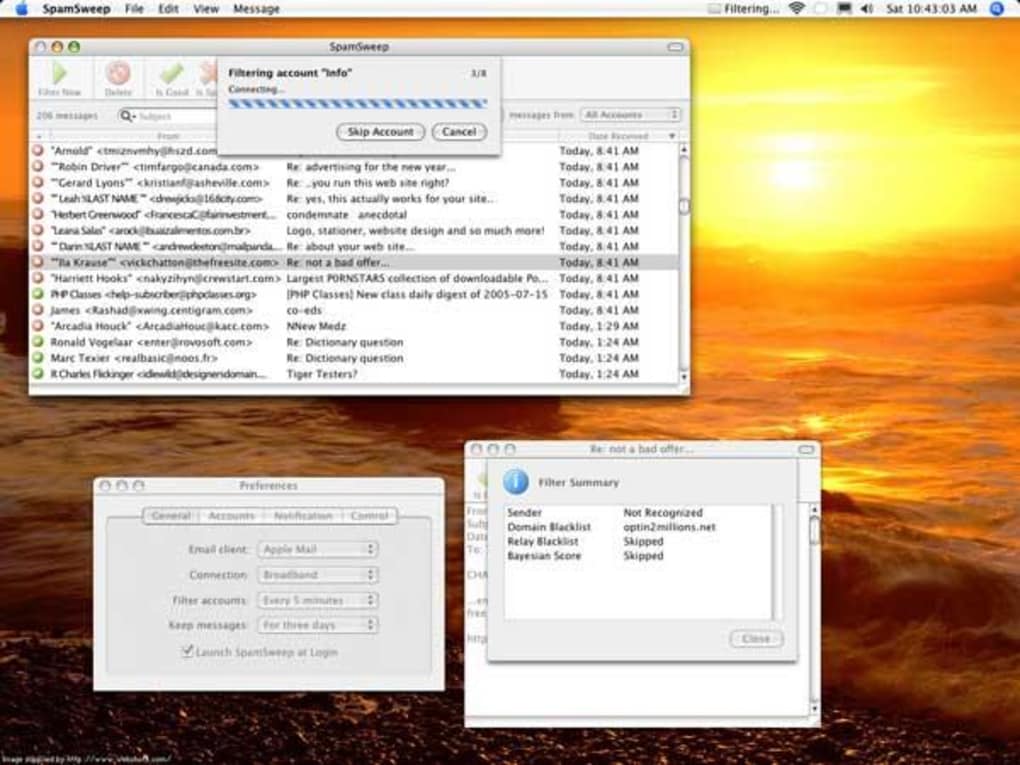
The software supports up to seven popular mail clients—including Thunderbird, Apple Mail and the classic Eudora—so you can protect multiple accounts from a single, lightweight interface. Whether you rely on IMAP, POP3, or a hybrid setup, SpamSweep will scan incoming mail, assign a Bayesian score, and either flag or automatically delete suspicious messages based on the rules you define. A clean, no‑frills UI lets you quickly sort by sender or subject, and the built‑in search box makes locating specific messages a breeze.
The real power lies in its custom filter engine: you can create whitelists for trusted senders, blacklist persistent junk domains, and fine‑tune the filter sensitivity for each account. When a message is marked as spam, SpamSweep presents a concise summary that shows the sender, any blacklisted domains, and the Bayesian score, giving you full transparency over the decision‑making process. Although the tool offers only two hotkeys for quick actions, the overall experience is fast, reliable, and secure—making SpamSweep a compelling addition to any email‑heavy workflow.
Key Features
- Advanced Bayesian filtering that adapts to your personal email patterns.
- Support for up to seven mail clients, including Thunderbird, Apple Mail, and Eudora.
- Full IMAP compatibility for cloud‑based email accounts.
- Customizable filters, whitelists, and blacklists for granular control.
- Automatic trashing of confirmed spam or manual review with a summary box.
- Simple search box for rapid message lookup.
- Periodic filtering schedule and optional notification settings.
- Lightweight interface with quick account switching.
Installation, Usage & Compatibility – Getting SpamSweep Up and Running
Installing SpamSweep is straightforward and takes just a few minutes. Begin by downloading the installer from the official website—choose the version that matches your operating system. The software is available for macOS (10.12 and later), Windows 10/11, and mobile platforms iOS and Android, ensuring that you can protect both desktop and on‑the‑go email accounts. Once the download completes, run the installer and follow the on‑screen prompts; the wizard will ask you to grant the necessary permissions to access your mail client(s) and, if applicable, your IMAP credentials.
After installation, launch SpamSweep and use the initial setup wizard to select the mail clients you wish to protect. You can add or remove accounts at any time from the Settings panel. For each account, specify the filtering frequency—options range from real‑time scanning to hourly or daily batch processing. The notification preferences let you choose whether you receive pop‑up alerts, email summaries, or silent updates when spam is detected.
Supported operating systems: macOS, Windows, iOS, Android.
Using SpamSweep on a daily basis is intuitive. The main dashboard displays a list of recent messages with clear indicators for spam and clean mail. Clicking on a flagged item opens the summary box, showing the Bayesian score, sender reputation, and any blacklist matches.
From here you can decide to delete, whitelist, or adjust the filter settings for similar future messages. The custom filter editor lets you define rules based on sender address, subject keywords, or even message size—although size‑based sorting is not currently available in the UI, you can still create a rule that catches unusually large attachments if that is a concern. For power users, the two hotkeys (Ctrl + S to mark as spam, Ctrl + U to undo) provide quick keyboard shortcuts, while the rest of the workflow can be handled with mouse clicks.
Updates are delivered automatically via the built‑in updater, which checks for new Bayesian definitions and security patches every 24 hours. Because SpamSweep operates locally on your device, your email data never leaves your machine, ensuring a secure, privacy‑first experience.
Pros, Cons & Frequently Asked Questions
Pros
- Highly accurate Bayesian filtering that improves over time.
- Works with multiple popular mail clients and IMAP accounts.
- Customizable whitelist/blacklist and filter rules give granular control.
- Lightweight UI with fast account switching and search functionality.
- Free to download and includes automatic updates for spam definitions.
Cons
- Interface is basic and lacks advanced visual customization.
- Only two keyboard shortcuts are available for quick actions.
- No built‑in sorting by message size, which some power users may miss.
- Mobile versions have limited feature sets compared to desktop.
FAQ – Your SpamSweep Questions Answered
Is SpamSweep really free?
Yes, SpamSweep can be downloaded and used at no cost. Optional premium add‑ons may be offered in the future, but the core spam‑filtering features remain free.
Can I use SpamSweep with Outlook?
Outlook is not listed among the officially supported clients, but you can still protect an Outlook IMAP account by configuring SpamSweep to scan the mailbox directly via IMAP.
How does the Bayesian scoring work?
The Bayesian engine analyses the frequency of words and patterns in both spam and legitimate messages you receive. It then assigns a probability score to each incoming email, indicating how likely it is to be spam. The more you train the system by marking messages, the more accurate the scores become.
Will SpamSweep delete important emails by mistake?
SpamSweep never deletes mail automatically unless you enable the “auto‑trash spam” option. By default, suspected spam lands in a separate folder where you can review it before deciding to delete or whitelist.
Is my data secure while using SpamSweep?
All processing occurs locally on your device; no email content is sent to external servers. This ensures that your private communications remain confidential and protected.
Conclusion – Secure Your Inbox Today
In the crowded world of email security tools, SpamSweep stands out for its simplicity, reliability, and Bayesian intelligence. It delivers robust spam protection across a wide range of mail clients and operating systems, all while keeping your data private and your experience lightweight. The ability to craft custom filters, maintain whitelists, and view detailed Bayesian scores gives power users the control they need without overwhelming casual users with unnecessary complexity.
If you’re looking for a free, easy‑to‑install solution that can adapt to your email habits and protect multiple accounts, SpamSweep is definitely worth a try. Download it now, run the quick setup wizard, and let the Bayesian engine start learning from your inbox. Say goodbye to junk mail clutter and hello to a cleaner, more productive email experience.
SpamSweep earns a solid four out of five stars for its accurate filtering, multi‑client support, and user‑friendly design. The lack of extensive hotkeys and a more polished UI keep it from a perfect score, but its core functionality is top‑notch.
Click here to download SpamSweep for free and start protecting your inbox now!







